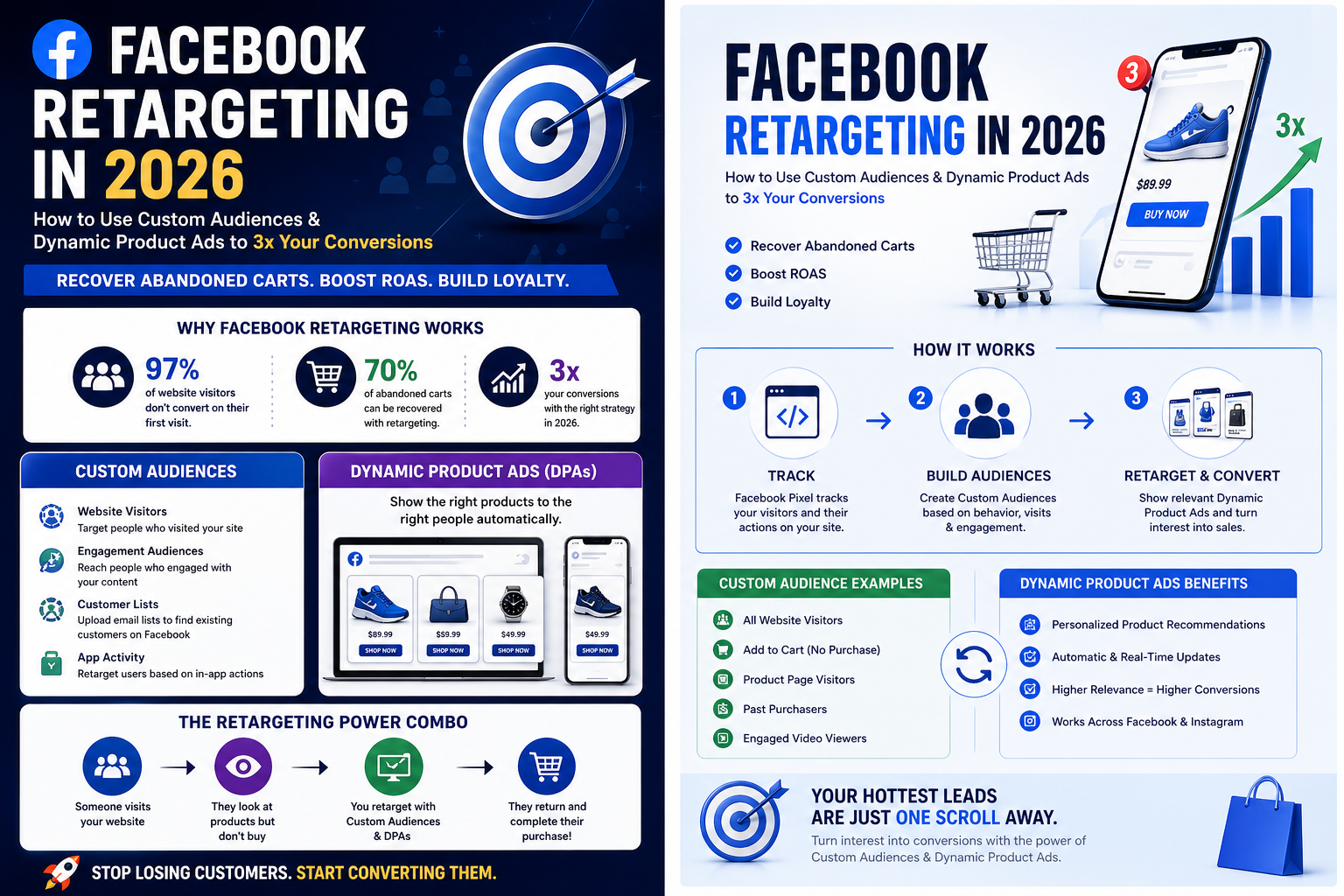
Introduction: Why Facebook Retargeting is a Game-Changer in 2026
Picture this: You spent $1,000 on Facebook ads to drive 1,000 visitors to your online store. But here's the kicker – only 30 of them actually bought something. What happened to the other 970 potential customers who showed interest but didn't convert?
Here's a reality check that'll make your marketing budget cry: 97% of website visitors don't convert on their first visit. They browse, they consider, they get distracted by a cat video, and poof – they're gone.
But what if I told you there's a way to bring them back without spending a fortune on new prospects? What if you could recover 70% of those abandoned carts without breaking the bank?
Enter Facebook retargeting – your secret weapon for turning window shoppers into paying customers. In 2026, with Custom Audiences and Dynamic Product Ads working together, you can create a marketing machine that literally follows your best prospects around the internet until they're ready to buy.
Think of retargeting as your friendly neighborhood reminder system. Just like how your mom used to remind you to take your lunch to school, Facebook retargeting gently nudges your potential customers about that amazing product they almost bought.
Ready to turn your marketing into a conversion powerhouse? Let's dive in.
What is Facebook Retargeting?
Let's start with the basics. Facebook retargeting is like having a photographic memory for everyone who's ever shown interest in your business. It's the digital equivalent of remembering every person who walked into your store, what they looked at, and following up with them later.
The Simple Explanation
Imagine you run a bakery. Someone walks in, smells your fresh croissants, picks one up, checks the price, but then leaves without buying. Traditional advertising would mean shouting louder to attract more random people. Retargeting means finding that specific croissant-lover and showing them a picture of those same croissants with a "Still thinking about these?" message.
How It Actually Works
Facebook retargeting uses two main tools:
Facebook Pixel: Think of this as a tiny invisible spy (the good kind) that you place on your website. Every time someone visits your site, the Pixel takes notes: "John looked at red sneakers for 2 minutes" or "Sarah added a laptop to her cart but didn't buy it."
Conversions API: This is Pixel's backup buddy. With iOS updates making tracking trickier, CAPI ensures you don't lose sight of your potential customers even when they're being privacy-conscious.
Retargeting vs. Regular Targeting: The Difference
Regular Facebook ads are like throwing darts blindfolded – you're hoping to hit something good. You target people based on demographics, interests, and behaviors, but you don't know if they've ever heard of your brand.
Retargeting ads are like throwing darts with perfect vision – you know exactly where to aim because these people have already raised their hands and said, "I'm interested!"
Common Retargeting Goals That Actually Work
Abandoned Cart Recovery: "Hey, you left something in your cart!"
Re-engagement: "Miss us? Here's what's new!"
Cross-sell/Upsell: "People who bought this also loved..."
Brand Awareness: "Thanks for visiting! Here's who we are."
Mini CTA: If you've installed your Facebook Pixel, you're already halfway there. Now let's get tactical with the strategies that separate the pros from the amateurs.
Deep Dive into Facebook Custom Audiences
Custom Audiences are like having a perfectly organized Rolodex of everyone who's ever interacted with your business. But instead of business cards, you have detailed behavioral data that tells you exactly what each person is interested in.
Types of Custom Audiences (And When to Use Each)
1. Website Traffic Audiences (The Holy Grail)
This is where the magic happens. Your Facebook Pixel tracks every visitor and categorizes them based on their behavior:
- All Website Visitors: Everyone who's been to your site
- Page Visitors: People who visited specific pages (like your pricing page)
- Time-Based: Visitors from the last 3, 7, 14, or 30 days
- Action-Based: People who added to cart, initiated checkout, or made a purchase
Pro Tip: Create separate audiences for different time windows. Someone who visited yesterday is much hotter than someone who visited 30 days ago.
2. Customer File Audiences (Your Goldmine)
Upload your customer email list, and Facebook will find these people on its platform. This is perfect for:
- Existing customers (for loyalty campaigns)
- Newsletter subscribers
- Past purchasers (for new product launches)
3. App Activity Audiences
If you have a mobile app, you can retarget people based on what they did inside your app. Did they browse products but not buy? Add them to a retargeting audience.
4. Engagement Audiences (The Overlooked Gem)
These are people who engaged with your Facebook or Instagram content:
- Video viewers (watched 25%, 50%, 75%, or 95% of your videos)
- Instagram profile visitors
- People who engaged with your posts
- Lead ad form openers (but didn't submit)
Step-by-Step Custom Audience Setup
Step 1: Go to Facebook Ads Manager → Audiences → Create Audience → Custom Audience
Step 2: Choose your source (Website, Customer File, App Activity, or Engagement)
Step 3: Define your rules. For website traffic:
- Select "All website visitors" or get specific with URLs
- Choose your time window (3-180 days)
- Add inclusion/exclusion rules
Step 4: Name your audience descriptively (e.g., "Added to Cart - Last 7 Days")
Step 5: Hit "Create Audience" and wait for it to populate
Best Practices That Actually Move the Needle
Segment by Funnel Stages
Don't treat someone who just discovered your brand the same as someone who abandoned their cart. Create audiences for:
- Top of Funnel (TOFU): Visited homepage, blog readers
- Middle of Funnel (MOFU): Viewed product pages, pricing page visitors
- Bottom of Funnel (BOFU): Added to cart, initiated checkout
Audience Size Sweet Spots
- Too Small (under 1,000): Facebook can't optimize effectively
- Too Large (over 2 million): You lose precision
- Just Right (10,000-500,000): The Goldilocks zone for most businesses
The Exclusion Game-Changer
Always exclude recent converters from your retargeting ads. Why waste money showing "Buy Now" ads to people who bought yesterday?
Pro Tips from the Trenches
Time Windows Strategy: Use shorter time windows (3-7 days) for high-intent audiences like cart abandoners, and longer windows (14-30 days) for general website visitors.
Lookalike Layering: Create Lookalike Audiences based on your best Custom Audiences. If your "Purchased in Last 30 Days" audience converts well, a 1% Lookalike of that audience will likely convert well too.
Seasonal Adjustments: Expand your time windows during slower seasons and contract them during busy periods when you have more recent, high-intent traffic.
Unlocking the Power of Dynamic Product Ads (DPAs)
Dynamic Product Ads are like having a personal shopping assistant for every single person who visits your website. They automatically show people the exact products they viewed, added to their cart, or similar items they might love.
What Are DPAs and Why They're Marketing Magic
Think of DPAs as the ultimate mind-reader. When someone looks at red running shoes on your website, DPAs will show them an ad featuring those exact red running shoes (plus maybe some matching athletic socks they didn't know they needed).
Here's what makes DPAs special:
- Automatic Personalization: No manual ad creation for thousands of products
- Real-Time Updates: If you change a price or product goes out of stock, the ad updates automatically
- Cross-Sell Intelligence: Shows related products based on what others bought
Real-World Examples That'll Inspire You
Amazon: Masters of the "People who viewed this also viewed..." approach. Their DPAs don't just show you what you looked at – they show you what you probably want to look at next.
Myntra: Uses DPAs to show different variations of clothing items you viewed. Looked at a blue dress? They'll show you the same dress in red, green, and black.
Nykaa: Shows you the exact lipstick shade you spent 10 minutes researching, plus the matching foundation you probably need.
The Science Behind DPA Success
DPAs work because they solve three major problems:
Decision Paralysis: Instead of showing all 10,000 products, they show the 3-5 most relevant ones
Recency Bias: They capitalize on fresh interest while it's still hot
Social Proof: They can include reviews, ratings, and "X people bought this today" messaging
Step-by-Step DPA Setup (The Complete Playbook)
Phase 1: Product Catalog Creation
Step 1: Go to Facebook Business Manager → Data Sources → Catalogs → Create Catalog
Step 2: Choose "E-commerce" and add your catalog name
Step 3: Upload your product feed (CSV/XML file with product details):
- Product ID
- Product Name
- Description
- Price
- Image URL
- Product URL
- Availability
Step 4: Set up automatic updates so your catalog stays fresh
Phase 2: Pixel and CAPI Connection
Step 1: Make sure your Facebook Pixel is firing correctly on all pages
Step 2: Set up standard events:
- ViewContent (when someone views a product)
- AddToCart (when someone adds to cart)
- Purchase (when someone completes a purchase)
Step 3: Connect Conversions API for backup tracking
Phase 3: Campaign Creation
Step 1: Create a new campaign with "Catalog Sales" objective
Step 2: Choose your target audience (this is where Custom Audiences shine)
Step 3: Select your product catalog and choose your ad format:
- Single image/video
- Carousel (multiple products)
- Collection (immersive shopping experience)
Step 4: Set up your creative templates with dynamic elements
Creative Best Practices for DPAs
Square Creatives Rule: Use 1:1 aspect ratio images for maximum placement coverage across Facebook and Instagram feeds, stories, and sidebar ads.
Template Consistency: Create branded templates so all your DPAs look cohesive, even though the products change.
Copy Personalization: Use dynamic fields like "Still thinking about these {{product.name}}?" or "Only {{product.inventory}} left in stock!"
Custom Audiences + DPAs = Retargeting Superpower
Here's where the magic really happens. When you combine Custom Audiences with Dynamic Product Ads, you create a retargeting system that's so precise, it's almost unfair to your competitors.
The Power Couple Workflow
Scenario 1: The Abandoned Cart Recovery Machine
Step 1: Create Custom Audience of people who added to cart but didn't purchase (last 3 days)
Step 2: Set up DPA campaign targeting this audience
Step 3: Use dynamic copy like "You left something in your cart! Complete your purchase and get free shipping"
Step 4: Show them exactly what they left behind, not random products
Real-World Result: Fashion retailer ASOS saw a 300% increase in cart recovery rates using this exact approach.
Scenario 2: The Cross-Sell Champion
Step 1: Create Custom Audience of recent purchasers (last 7 days)
Step 2: Set up DPA campaign showing complementary products
Step 3: Use copy like "Complete your look" or "Customers who bought X also loved Y"
Step 4: Exclude the exact products they already bought
Real-World Result: Electronics retailer Best Buy increased average order value by 25% using cross-sell DPAs.
Scenario 3: The Win-Back Warrior
Step 1: Create Custom Audience of past customers who haven't purchased in 60+ days
Step 2: Set up DPA campaign showing new arrivals or their favorite categories
Step 3: Use copy like "We miss you! Check out what's new" with a welcome-back discount
Step 4: Include social proof and urgency elements
Advanced Personalization Strategies
Dynamic Pricing Psychology
- Show original price with strikethrough and sale price
- Include "Save $X" messaging
- Add urgency with "Sale ends in X hours"
Product-Specific Copy Variations
- Luxury items: Focus on quality and exclusivity
- Practical items: Emphasize value and functionality
- Trendy items: Highlight popularity and social proof
Behavioral Triggers
- Quick Browsers: "Need more time to decide? Here's 10% off"
- Research-Heavy Viewers: "Based on your research, customers recommend..."
- Cart Abandoners: "Your items are waiting! Complete your purchase now"
Exclusion Logic That Saves You Money
Recent Purchasers: Don't show "Buy Now" ads to people who bought yesterday
Out-of-Budget Customers: If someone only looks at items under $50, don't show them $500 products
Geographic Restrictions: Don't show products you can't ship to certain locations
Inventory-Based: Automatically exclude out-of-stock items
Advanced Strategies to Optimize Your Retargeting Campaigns
Now that you've got the basics down, let's separate the amateurs from the pros with advanced strategies that can double your ROAS.
Frequency Capping: The Art of Not Being Annoying
There's a fine line between staying top-of-mind and becoming that clingy ex who won't stop texting. Here's how to find the sweet spot:
The 3-7-1 Rule:
- Show your ad maximum 3 times per day
- Maximum 7 times per week
- Take a 1-week break after 7 exposures
Frequency-Based Creative Rotation:
- Impressions 1-3: Product-focused ads
- Impressions 4-6: Value proposition and social proof
- Impressions 7+: Discount or urgency-based messaging
Creative Testing That Actually Matters
The A/B Testing Hierarchy:
Headlines (biggest impact on performance)
Images/Videos (emotional connection)
Call-to-Action (conversion optimization)
Ad Copy (persuasion refinement)
Creative Fatigue Signals:
- CTR drops by 50%+ from initial performance
- CPC increases by 25%+
- Frequency climbs above 4 without conversions
Refresh Strategy: Replace creatives every 7-14 days, or when performance drops 20% from peak.
Bidding Strategies for Maximum ROI
Manual Bidding for Control Freaks:
- Start with Cost Cap bidding
- Set your maximum acceptable CPA
- Scale by gradually increasing budgets (20% every 3 days)
Automatic Bidding for Efficiency:
- Use Lowest Cost with a spending limit
- Let Facebook optimize within your comfort zone
- Perfect for campaigns with consistent performance
Bid Strategy by Audience Temperature:
- Hot Audiences (cart abandoners): Aggressive bidding for quick captures
- Warm Audiences (website visitors): Balanced approach
- Cool Audiences (engagement): Conservative bidding for long-term nurturing
UTM Tracking for Deeper Insights
Set up UTM parameters to track performance beyond Facebook's reporting:
UTM Structure:
- Source: facebook
- Medium: retargeting
- Campaign: descriptive-campaign-name
- Content: audience-type (e.g., cart-abandoners)
- Term: ad-creative-version
This gives you granular data in Google Analytics about which retargeting audiences drive the most valuable traffic.
Omnichannel Integration: The 1+1=3 Approach
Email + Facebook Sync:
- Sync your email segments with Facebook Custom Audiences
- Show Facebook ads to people who opened but didn't click emails
- Follow up email campaigns with Facebook retargeting
Expert Insight: "Combining Klaviyo email flows with Facebook DPAs can lift conversions by 38% because you're creating multiple touchpoints across different channels," says Sarah Martinez, Senior Performance Marketing Manager at Glossier.
SMS + Facebook Retargeting:
- Create Custom Audiences from SMS subscribers
- Use different messaging channels for different urgency levels
- SMS for immediate offers, Facebook for brand building
Common Mistakes That Are Killing Your Retargeting ROI
Even experienced marketers make these costly mistakes. Here's your cheat sheet to avoid them:
Mistake #1: The "Spray and Pray" Approach
What You're Doing Wrong: Creating one massive retargeting audience with everyone who's ever visited your website.
Why It's Costly: You're showing the same message to someone who just discovered your brand and someone who abandoned their cart 5 minutes ago.
The Fix: Segment your audiences by behavior and funnel stage. Create specific campaigns for specific actions.
Mistake #2: Forgetting to Exclude Converters
What You're Doing Wrong: Showing "Buy Now" ads to people who purchased yesterday.
Why It's Costly: You're literally throwing money at people who can't buy again immediately.
The Fix: Always exclude recent purchasers (1-7 days depending on your business) from acquisition-focused retargeting ads.
Mistake #3: Creative Stagnation
What You're Doing Wrong: Using the same ad creative for 30+ days.
Why It's Costly: People get blind to your ads, performance tanks, and you're burning budget on ineffective creative.
The Fix: Rotate creatives every 7-14 days. Test new angles, images, and copy regularly.
Mistake #4: Overlapping Audiences
What You're Doing Wrong: Having multiple campaigns targeting the same people.
Why It's Costly: Your campaigns compete against each other, driving up costs and reducing efficiency.
The Fix: Use Facebook's Audience Overlap tool to identify conflicts and create exclusion rules.
Mistake #5: Stale Product Catalogs
What You're Doing Wrong: Not updating your product feed regularly.
Why It's Costly: You're showing ads for out-of-stock products or wrong prices, creating frustrated customers.
The Fix: Set up automatic product feed updates daily or weekly, depending on how often your inventory changes.
Mistake #6: Ignoring Mobile Optimization
What You're Doing Wrong: Creating ads optimized for desktop when 80%+ of Facebook users are on mobile.
Why It's Costly: Poor mobile experience = higher bounce rates and lower conversions.
The Fix: Always preview your ads on mobile devices. Use square or vertical creatives for better mobile placement.
Essential Tools & Resources for Retargeting Success
Facebook Native Tools
Facebook Ads Manager: Your mission control center
- Campaign creation and management
- Audience insights and overlap analysis
- Performance reporting and optimization
Facebook Pixel Helper: Chrome extension for troubleshooting
- Verify pixel installation
- Check event firing
- Debug tracking issues
Facebook Analytics: Deep dive into user behavior
- Cross-device tracking
- Customer journey analysis
- Conversion path optimization
Product Feed Management Tools
DataFeedWatch:
- Advanced feed optimization
- Multi-channel feed management
- Automated rule-based optimizations
Flexify:
- Real-time feed updates
- Advanced filtering and transformation
- Integration with multiple ad platforms
Google Merchant Center:
- Free feed management
- Integration with Facebook catalogs
- Basic optimization features
Automation & Analytics
Revealbot:
- Automated bid adjustments
- Performance-based budget allocation
- Custom rule creation for scaling
Triple Whale:
- Unified analytics dashboard
- Attribution modeling
- ROI tracking across channels
Klaviyo:
- Email marketing automation
- Facebook Custom Audience sync
- Cross-channel customer journey tracking
Tracking & Attribution
Google Analytics 4:
- Cross-platform tracking
- Enhanced ecommerce reporting
- Custom conversion tracking
Facebook Conversions API:
- Server-side tracking backup
- iOS 14+ privacy compliance
- Improved data accuracy
Future of Retargeting in a Privacy-First World (2026 and Beyond)
The retargeting landscape is evolving faster than ever. Here's what you need to know to stay ahead:
iOS 17+ and Data Tracking Reality Check
What's Changed:
- App Tracking Transparency (ATT) limits cross-app tracking
- Users can opt out of tracking more easily
- Attribution windows are shorter and less accurate
What This Means for You:
- Expect 20-30% less tracking accuracy
- Pivot to first-party data collection
- Focus on value exchange for data sharing
Server-Side Tracking: Your Insurance Policy
Conversions API Benefits:
- Bypasses browser-based tracking limitations
- More accurate event tracking
- Better data security and privacy compliance
Implementation Priority: If you're not using CAPI yet, make it your #1 technical priority for 2026.
Meta's Adaptation Strategies
Aggregated Event Measurement:
- Optimizes for conversion events in aggregate
- Reduces reliance on individual user tracking
- Maintains campaign effectiveness with privacy compliance
AI-Powered Targeting:
- Machine learning fills gaps in tracking data
- Behavioral prediction improves without extensive tracking
- Broad targeting becomes more effective
Future-Proofing Your Retargeting Strategy
First-Party Data Collection
Email Capture Optimization:
- Offer genuine value for email signup
- Use progressive profiling to gather data gradually
- Integrate email data with Facebook Custom Audiences
Customer Data Platform (CDP):
- Centralize customer data from all touchpoints
- Create unified customer profiles
- Power retargeting with rich behavioral data
CRM Integration Deep Dive
Sync Strategy:
- Upload customer data weekly to maintain fresh audiences
- Use lifetime value data for bid optimization
- Create segments based on purchase history and preferences
Data Enrichment:
- Add demographic and psychographic data
- Use purchase history for predictive modeling
- Create lookalike audiences from high-value customer segments
Conclusion + Your 30-Day Action Plan
You now have the complete playbook for Facebook retargeting success in 2026. But knowledge without action is just expensive entertainment. Here's your step-by-step roadmap to implementation:
Week 1: Foundation Building
Day 1-3: Audit your current Facebook Pixel setup
- Verify pixel installation on all pages
- Test standard events (ViewContent, AddToCart, Purchase)
- Set up Conversions API if not already implemented
Day 4-7: Create your first Custom Audiences
- All website visitors (30 days)
- Add to cart but no purchase (7 days)
- Past purchasers (exclude from acquisition campaigns)
Week 2: Dynamic Product Ads Setup
Day 8-10: Build your product catalog
- Create comprehensive product feed
- Set up automatic updates
- Test catalog connectivity with Pixel
Day 11-14: Launch your first DPA campaign
- Target cart abandoners with specific products they viewed
- Use square creative format
- Set frequency cap at 3 per day, 7 per week
Week 3: Advanced Audience Creation
Day 15-18: Create funnel-specific audiences
- Top of funnel: Blog readers, homepage visitors
- Middle of funnel: Product page viewers, pricing page visitors
- Bottom of funnel: Checkout initiators, high-value product viewers
Day 19-21: Set up cross-sell campaigns
- Target recent purchasers with complementary products
- Create exclusion logic for products already owned
- Use social proof in ad copy
Week 4: Optimization and Scaling
Day 22-25: Analyze performance and optimize
- Review frequency metrics and adjust caps
- Test new creative variations
- Optimize audiences based on performance data
Day 26-30: Scale successful campaigns
- Increase budgets on best-performing ad sets by 20%
- Create lookalike audiences from top converters
- Expand to additional placements and formats
Your Success Metrics to Track
Immediate Metrics (Check Daily):
- Click-through rate (CTR)
- Cost per click (CPC)
- Frequency
Conversion Metrics (Check Weekly):
- Return on ad spend (ROAS)
- Cost per acquisition (CPA)
- Conversion rate by audience type
Business Impact Metrics (Check Monthly):
- Customer lifetime value from retargeted users
- Overall marketing efficiency ratio
- Revenue attribution to retargeting campaigns
Final Thoughts: Your Hottest Leads Are Just One Scroll Away
Remember, retargeting isn't just about recovering lost sales – it's about building relationships with people who've already shown interest in what you offer. Every person in your Custom Audiences represents someone who took time out of their busy day to check out your business.
Your job is to stay helpful, relevant, and valuable as you guide them from interest to purchase to loyalty.
The strategies in this guide have helped thousands of businesses turn their biggest expense (advertising) into their biggest asset (customer acquisition). But success isn't guaranteed – it's earned through consistent testing, optimization, and customer-focused messaging.
Your hottest leads are just one scroll away. Go get them.
Ready to transform your Facebook advertising? Subscribe to our newsletter for weekly insights, case studies, and advanced strategies that keep you ahead of the curve. Plus, get our exclusive "30-Day Retargeting Optimization Checklist" delivered straight to your inbox.
Frequently Asked Questions
What is the best Custom Audience for retargeting?
The best Custom Audience depends on your business model, but cart abandoners typically provide the highest ROI. These users have shown strong purchase intent and just need a gentle nudge to complete their transaction. For e-commerce businesses, create a Custom Audience of people who added to cart in the last 3-7 days, excluding recent purchasers.
How do I set up Dynamic Product Ads on Facebook?
Setting up DPAs requires three main steps: First, create a product catalog in Facebook Business Manager with your product feed (including product ID, name, price, image, and URL). Second, ensure your Facebook Pixel is tracking ViewContent, AddToCart, and Purchase events. Third, create a catalog sales campaign in Ads Manager, connect your catalog, and choose your target audience and creative format.
What is the ideal frequency for retargeting ads?
The ideal frequency depends on your audience temperature and campaign objective. For high-intent audiences like cart abandoners, 3-5 impressions over 3-7 days works well. For broader website visitor audiences, keep frequency under 3-4 impressions per week. Always monitor for frequency fatigue – if CTR drops significantly or CPC increases, it's time to refresh your creative or give your audience a break.
Can I use Facebook retargeting without a website?
Yes, you can create Custom Audiences without a website using several methods: upload customer email lists, target people who engaged with your Facebook or Instagram posts, create audiences from video viewers, or retarget people who interacted with your lead ads. However, website-based retargeting typically provides the most comprehensive behavioral data for optimization.
How long should I keep people in my retargeting audiences?
The optimal duration varies by business and customer behavior. For e-commerce, 7-30 days works well for most products. High-consideration purchases (cars, software, luxury items) might warrant 60-90 day windows. B2B services often use 90-180 day windows due to longer sales cycles. Test different time windows and monitor conversion rates to find your sweet spot.
What's the difference between Facebook retargeting and Google retargeting?
Facebook retargeting excels at social proof, visual storytelling, and catching people during leisure browsing time. It's great for impulse purchases and brand building. Google retargeting (display network) captures people with active search intent across millions of websites. Facebook typically has better targeting options and creative flexibility, while Google offers broader reach and intent-based targeting.
How much should I spend on retargeting campaigns?
A good starting point is allocating 20-30% of your total Facebook ad budget to retargeting campaigns. High-performing businesses often spend 40-50% on retargeting because these audiences convert at higher rates and lower costs. Start with smaller budgets ($10-20/day per audience) to test performance, then scale successful campaigns by increasing budgets 20% every 3-5 days based on performance data.
Want to Build a Similarly
Powerful Growth System?
Apply for a 20-minute growth audit where we'll dissect your current funnels and identify exactly where you're leaving revenue on the table.